
A successful application does more than work well when it launches. It needs to continue performing as the business grows.
As an application gains users, processes more data, handles more transactions, and connects with more systems, the demands placed on its architecture can change significantly.
This is why scalability should be considered from the beginning of software development.
Scalability refers to an application’s ability to accommodate increasing workloads while continuing to meet performance and reliability requirements. AWS describes performance efficiency as the ability to use computing resources effectively while maintaining that efficiency as demand changes.
For businesses, this means building software that is not only functional today, but capable of evolving with tomorrow’s requirements.
What Makes an Application Scalable?
A scalable application is designed to handle growth without requiring a complete redesign every time demand increases.
That growth can come in many forms:
- More users accessing the application
- Higher transaction volumes
- Increasing amounts of data
- Additional business processes
- More integrations
- New geographic markets
- More complex workloads
- Increased demand during peak periods
Scalability is therefore not simply about making an application faster.
It involves designing the entire technology environment so that different components can adapt as demand changes.
Google Cloud’s Well-Architected Framework recommends approaches such as horizontal scalability, modular design, and stateless architectures to help applications scale efficiently.
Why Scalability Matters to Businesses
Poor scalability can become a business problem.
An application that performs well with 1,000 users may behave very differently with 100,000 users. A database that works for a small dataset may eventually become a bottleneck. A tightly connected application may become increasingly difficult to modify as new features and integrations are added.
When scalability is considered early, businesses can create systems that are better prepared for growth.
A scalable application can help organizations:
- Support increasing demand
- Maintain a consistent user experience
- Reduce performance bottlenecks
- Add new capabilities more efficiently
- Respond to changing business requirements
- Avoid unnecessary rework
- Improve long term maintainability
Solutions Resource similarly positions its software development services around scalable, secure, and high-performing applications designed to evolve with business needs.
7 Best Practices for Building Scalable Applications
1. Start With the Right Architecture
Architecture decisions have a major influence on how an application can scale.
A system that is tightly coupled may become increasingly difficult to modify as it grows. More modular architectures can allow individual components to evolve independently.
Google Cloud’s current Well-Architected Framework recommends loosely coupled and modular designs because they allow organizations to control performance, reliability, security, and cost at the component level.
Depending on the application, organizations may consider approaches such as:
- Modular architectures
- Microservices
- Service oriented architectures
- Event driven architectures
- API based systems
- Serverless architectures
There is no single architecture that is right for every application.
The right choice depends on the application’s requirements, team capabilities, expected workload, operational complexity, and business goals.
2. Design for Horizontal Scalability
One important scalability approach is horizontal scaling, which means adding more computing resources rather than continually increasing the capacity of a single machine.
For example, instead of relying on one increasingly powerful server, an application can distribute workloads across multiple instances.
Google Cloud recommends horizontal scalability as a way to accommodate growing traffic and data while maintaining application performance. Its guidance also recommends modular and stateless designs to make adding or removing resources easier.
Horizontal scalability can be particularly useful for applications that experience fluctuating demand.
Resources can potentially be added when workloads increase and reduced when demand decreases.
3. Use Cloud Infrastructure Strategically
Cloud platforms can provide organizations with flexible infrastructure for applications with changing workloads.
However, simply hosting an application in the cloud does not automatically make it scalable.
The architecture still needs to be designed appropriately.
AWS recommends evaluating architecture choices based on workload requirements, using benchmarking and data to guide decisions, and dynamically scaling computing resources where appropriate.
Cloud scalability may involve technologies such as:
- Load balancing
- Auto scaling
- Managed databases
- Containers
- Serverless computing
- Content delivery networks
- Managed storage
- Caching
The goal is to select the technologies that best match the application’s actual workload.
4. Design the Data Layer for Growth
As applications grow, data can become one of their biggest scalability challenges.
More users often means more records, transactions, queries, and concurrent database connections.
A scalable data architecture should consider:
- Database selection
- Query performance
- Indexing
- Data partitioning
- Caching
- Replication
- Data lifecycle management
- Backup and recovery
AWS specifically recommends selecting data stores based on access and storage requirements, monitoring data store performance, improving query performance, and using caching where appropriate.
The right data architecture depends heavily on the application’s workload.
A transactional application, analytics platform, and real time application may have very different requirements.
5. Build for Performance From the Beginning
Performance problems are often easier to prevent than to fix after an application has already grown.
Performance should therefore be considered throughout development.
Teams can use:
- Performance testing
- Load testing
- Application monitoring
- Database optimization
- Caching
- Efficient APIs
- Content delivery networks
- Resource optimization
AWS recommends load testing, monitoring, benchmarking, and regular performance reviews as part of maintaining performance efficiency.
Testing should reflect realistic scenarios.
For example, if an application is expected to experience a significant increase in traffic during a product launch, teams should evaluate how the system performs under that type of workload before launch day.
6. Make Reliability Part of Scalability
Scalability and reliability should not be treated as completely separate concerns.
An application may technically be capable of handling more traffic, but that does not necessarily mean it can continue operating reliably when something goes wrong.
Google Cloud’s reliability guidance recommends practices including redundancy, monitoring, automated recovery, fault tolerant design, and testing recovery processes.
Scalable applications should therefore consider:
- Redundancy
- Failure recovery
- Backups
- Monitoring
- Disaster recovery
- Graceful degradation
- Fault isolation
The objective is not simply to handle growth.
It is to remain dependable as the system becomes larger and more complex.
7. Monitor and Improve Continuously
Scalability is not a one time project.
Once an application is deployed, teams need visibility into how it behaves under real workloads.
Monitoring can help identify:
- Increasing response times
- Higher error rates
- Database bottlenecks
- Resource utilization
- Unexpected traffic patterns
- Capacity issues
- System failures
Google Cloud recommends using metrics, logs, and traces to provide observability into applications and help teams identify potential problems proactively.
This creates a feedback loop:
Build → Measure → Identify → Improve → Scale
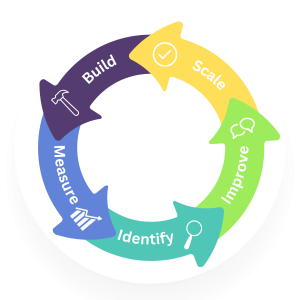
Instead of waiting until users experience a major performance problem, teams can use operational data to identify areas that need attention.
Scalability vs. Performance: What’s the Difference?
These two concepts are closely related, but they are not the same.
Performance asks:
How well does the application perform under a given workload?
Scalability asks:
How well can the application continue performing as the workload increases?
An application can be extremely fast with a small number of users but still have poor scalability.
For example, a system might respond almost instantly when used by a small team but experience significant delays when thousands of users access it simultaneously.
A scalable architecture is designed to maintain acceptable performance as demand changes.
Common Scalability Challenges
Building scalable applications requires planning because several issues can limit growth.
Monolithic Architecture
A large, tightly coupled application can become difficult to modify or scale selectively.
Database Bottlenecks
As data volume and traffic increase, inefficient queries or database architecture can affect the entire application.
Poorly Designed APIs
Inefficient APIs can create unnecessary network traffic and slow down dependent systems.
Single Points of Failure
If a critical component fails and there is no redundancy, the entire application may become unavailable.
Lack of Monitoring
Without appropriate metrics and observability, teams may not know where performance problems are developing.
Overengineering
Scalability does not mean building the most complex architecture possible.
An overly complicated architecture can increase development and operational costs without providing meaningful business value.
The best architecture is the one that provides the appropriate level of scalability for the application’s actual requirements.
When Should You Think About Scalability?
Ideally, scalability should be considered before development begins.
That does not mean predicting every possible future scenario.
Instead, teams can establish reasonable expectations around:
- Expected user growth
- Transaction volumes
- Data growth
- Peak traffic
- Geographic expansion
- Integration requirements
- Business growth
- Performance targets
These expectations can inform architecture and technology decisions.
At the same time, scalability should be approached pragmatically.
Building an enterprise scale architecture for a small application with minimal demand may create unnecessary complexity and cost.
The goal is to build an architecture that can evolve as the business evolves.
A Practical Approach to Building Scalable Applications
A strong development process can make scalability easier to manage.
Step 1: Understand the Workload
Identify who will use the application, how often, and what types of operations they will perform.
Step 2: Define Growth Expectations
Estimate how users, data, transactions, and integrations could change over time.
Step 3: Select an Appropriate Architecture
Choose an architecture that supports the application’s current needs while allowing reasonable future growth.
Step 4: Design for Performance
Consider application performance, database efficiency, networking, caching, and resource utilization.
Step 5: Test Under Load
Use realistic workloads to identify bottlenecks before they affect production users.
Step 6: Implement Observability
Monitor metrics, logs, traces, errors, and business indicators.
Step 7: Continuously Improve
Use real-world data to refine the architecture as requirements and workloads change.
Building Software That Grows With Your Business
Scalability is ultimately about preparing technology for change.
Businesses grow. User expectations change. Data increases. New integrations become necessary. New products and services are introduced.
Applications need to evolve alongside those changes.
A scalable application does not necessarily need the most advanced architecture available. It needs an architecture that is appropriate for the business, measurable in production, maintainable by the team, and capable of adapting to future requirements.
By considering architecture, data, cloud infrastructure, performance, reliability, and observability from the beginning, organizations can create software that is better prepared for long term growth.
Build for What’s Next
At Solutions Resource, we build web, mobile, API driven, and AI enabled applications designed around business requirements, with a focus on scalability, security, performance, and long term growth.
Whether you’re developing a new digital product or scaling an existing application, the right architecture can help your technology keep pace with your business.
👉 Ready to build an application designed for growth?

 By
By
 By
By


 By
By